







Hive Developer Portal - संसाधन

अवलोकन
Hive has an active developer community that is constantly innovating on the blockchain. While their presence on this page doesn’t constitute endorsement, it’s likely a few of these projects could be beneficial for your Hive idea.
सफ़ेद कागज
The Hive Whitepaper provides a more in depth technical analysis of how the Hive blockchain operates.
SDK Reference
SDK and client library links for building Hive applications.
Use this page as a starting point for choosing a Hive SDK or client library. API method pages may also include an inline SDK Reference box with method-specific links for Hive-JS, Beem, hive-ruby, and related clients.
| SDK / library | Runtime | Primary use | Package | Source / docs |
|---|---|---|---|---|
| WAX | TypeScript, C++, Python | Protocol-compatible transaction and object handling | @hiveio/wax |
Source |
| Workerbee | JavaScript / TypeScript | Automation helpers built on WAX and Beekeeper | - | Source |
| DHive | JavaScript / TypeScript | API calls, transaction construction, signing, and broadcasting | @hiveio/dhive |
Source |
| Hive-JS | JavaScript | Browser and Node.js Hive API and transaction helpers | @hiveio/hive-js |
Source |
| Hive-TX | JavaScript | Lightweight transaction creation, signing, and broadcasting | hive-tx |
Source |
| Beem | Python | Python API client, wallet helpers, and CLI tooling | beem |
Docs / Source |
| Lighthive | Python | Lightweight Python RPC client | lighthive |
Source |
| Radiator | Ruby | Ruby API client for Hive | radiator |
Source |
| hive-ruby | Ruby | Ruby API helpers used by this portal tooling | hive-ruby |
Docs |
| hive-php | PHP | PHP client for Hive blockchain APIs | - | Source |
| Aioha | JavaScript / TypeScript | Authentication provider integration | @aioha/aioha |
Source |
| Hivesigner SDK | JavaScript | Hivesigner login and transaction flows | hivesigner |
Source |
| Hive Keychain SDK | JavaScript | Hive Keychain browser extension integration | keychain-sdk |
Resource page |
For language-specific walkthroughs, see the JavaScript tutorials, Python tutorials, Ruby tutorials, and PHP tutorials.
Hivesigner
What is Hivesigner?
The goal of Hivesigner is to provide a safe way of connecting to the blockchain via 3rd party apps without compromising the security of your private keys and passwords. It’s a simple identity layer built on top of the blockchain allowing users safe access and developers the freedom of not having to handle the authentication system, i.e. managing users’ private keys and encryption. This means that devs won’t have to open-source their projects in order to gain user trust. When connecting to apps in this manner, neither Hivesigner nor the authorized app store the private keys as the posting key is encrypted on your cookie.
How Hivesigner is implemented
Hivesigner works by granting an access token to the requesting app once the application has been approved. A full tutorial on how to set up an application, request authorization and grant access can be found here.
Hive Authorisation and OAuth 2
The OAuth protocol allows third party apps to grant limited access to an HTTP service, either on behalf of a resource owner or by allowing the app to obtain access on its own behalf. The authorization is provided without the private key or password of the user being shared with the third party. Simplified, the process includes the following steps:
- The user is presented with an authorization link that requests a token from the API
- The user has to log in to the service to verify their identity whereupon they will be prompted to authorize the application
- The user is redirected to the application redirect URI along with the access token
Once the application has an access token, it may use the token to access the user’s account via the API, limited to the scope of access, until the token expires or is revoked. A full breakdown of OAuth2 and how it applies to Hive and Hivesigner can be found here.
Useful Links
Hivesigner SDK - https://github.com/ecency/hivesigner-sdk
An official javascript library for utilizing Hivesigner.
For additional material you can refer to the original Hive blog post by @good-karma
Hive Keychain
Hive Keychain is a browser extension solution to integrate web sites with the Hive blockchain.
Useful Links
HiveAuth
HiveAuth is an authentication service/solution to integrate apps with the Hive blockchain.
Your Hive account name is your Key!
Authenticate on any mobile, desktop or website application without providing any password or private key.
No email address or phone number required. No more “lost email” or “lost password”. No more changing your password every N days.
Useful Links
For information on integrating HiveAuth into your own application, see: Official integration documentations
Aioha
Aioha (All-In-One Hive Authentication) is an API that provides a common interface for working with different Hive login providers. This allows easier integration of Hive login and transacting on the network with fewer code.
Useful Links
Drone middleware
API caching layer application, Jussi replacement
Drone is an API caching layer application for the Hive blockchain. It is built using Rust with Actix Web, and its primary purpose is to cache and serve API requests for a specific set of methods. Drone is totally meant to be a Jussi replacement, it aims to improve API node performance.
The purpose of this document is to help developers and node operators set up their own drone node within a docker container.
Note: Drone is the modern replacement for Jussi, offering better performance and reliability through Rust.
Intro
Drone is a reverse proxy that sits between the API client and the hived server. It allows node operators to route an API call to nodes that are optimized for the particular call, as if they are all hosted from the same place.
Sections
Features
- Written in Rust for optimal performance and reliability.
- Actix Web for high-performance, asynchronous HTTP handling.
- LRU cache with time-based expiration to store API responses.
- Multiple API endpoints support for seamless request handling with HAF apps.
- Caching support for select Hive API methods to reduce strain on API nodes.
- Compatible with existing Jussi configurations for easy migration.
Installation
Docker (Recommended)
To run drone using Docker:
git clone https://gitlab.syncad.com/hive/drone.git
cd drone
cp config.example.yaml config.yaml
# Edit config.yaml to configure your endpoints
docker-compose up --build -d
The docker-compose setup will:
- Build the Rust application
- Expose the service on port 3000 (mapped to internal port 8999)
- Mount your config.yaml file
- Set up logging with a maximum size of 20GB
Native
To run drone natively, you’ll need Rust installed on your system.
git clone https://gitlab.syncad.com/hive/drone.git
cd drone
cp config.example.yaml config.yaml
# Edit config.yaml to configure your endpoints
cargo run --release
For production deployments, you can build the binary:
cargo build --release
./target/release/drone
Try out your local configuration:
curl -s --data '{"jsonrpc":"2.0", "method":"condenser_api.get_block", "params":[8675309], "id":1}' http://localhost:9000
Configuration
Drone uses a YAML configuration file (config.yaml) instead of JSON. The configuration is divided into several sections:
Drone Settings
drone:
  port: 9000                        # Port to listen on
  hostname: 0.0.0.0                # Bind address
  cache_max_capacity: 4294967296   # Max cache size (4GB)
  operator_message: "Drone by Deathwing"
  middleware_connection_threads: 8  # HTTP connection pool size
Backend Configuration
Define your backend servers:
backends:
  hived: http://haproxy:7008
  hivemind: http://haproxy:7002
  hafah: http://haproxy:7003
  hived-sync: http://haproxy:7006
URL Routing
Route specific API methods to appropriate backends:
urls:
  bridge: hivemind
  hived: hived
  appbase.condenser_api.get_block: hived
  appbase.block_api.get_block: hafah
  # ... more routes
TTL Configuration
Set cache TTL (Time To Live) for different methods:
ttls:
  hived: 3
  hived.login_api: NO_CACHE
  hived.network_broadcast_api: NO_CACHE
  hived.database_api.get_block: EXPIRE_IF_REVERSIBLE
  bridge.get_discussion: 6
  # ... more TTL settings
TTL values can be:
- Positive integer: Cache for that many seconds
- NO_CACHE: Don’t cache this method
- NO_EXPIRE: Cache forever
- EXPIRE_IF_REVERSIBLE: Cache for 9 seconds if reversible, forever if irreversible
Timeouts
Configure request timeouts:
timeouts:
  hived: 5
  hived.network_broadcast_api: 0  # 0 = no timeout
  bridge: 30
Cached API Methods
The list of which methods are cached and their cache TTL is configured in the config.yaml file. The keys used to specify the method names in the config file follow Jussi’s rules for parsing method names, so you should be able to port your existing Jussi config.json easily.
Endpoints
The application has the following two primary endpoints:
GET /: Health check endpoint that returns the application status, version, and operator message in JSON format.
Example response:
{
  "status": "OK",
  "version": "0.3.0",
  "operator_message": "Drone by Deathwing"
}
POST /: API call endpoint that takes the JSON-RPC request, caches the response (if supported), and returns the response data.
Example request:
curl -s --data '{"jsonrpc":"2.0", "method":"condenser_api.get_dynamic_global_properties", "params":[], "id":1}' http://localhost:9000
Repository
- Repository: gitlab.syncad.com/hive/drone
- Issues: gitlab.syncad.com/hive/drone/-/issues
टूल्स
ChainSync - https://github.com/aaroncox/chainsync
A simple library to stream blocks and operations for digesting into other mediums.
Interactive Hive API - https://hive.hivesigner.com/
Interactive Hive API swagger, open-source script allows you to simply studying Hive API + Hivesigner API so you can start building decentralized apps in matter of hours.
HiveSQL - https://hivesql.io/
A private Microsoft SQL server database with Hive blockchain data, subscription based, allows you to do flexible queries and analyze blockchain data.
eSync - https://github.com/ecency/esync
eSync extracts Hive blockchain data and saves into Mongodb, written in Nodejs.
Many more projects and tools can be found at https://hiveprojects.io
Dev support
HiveDevs Chat - https://discord.gg/B29Bbng
HiveDevs chat is a public Discord chat community where members of the Hive development community go to discuss Hive development, and other related topics.
It is a great place to go to ask questions, meet other developers that are working on Hive projects, share tips and code snippets, and discuss the items you are working on.
This discord also has an accompanying Hive Community: HiveDevs
Jussi
A reverse proxy that forwards json-rpc requests.
Note: Jussi is no longer actively maintained. For new deployments, please use Drone, the modern replacement written in Rust.
Jussi is a custom-built caching layer for use with hived.
The purpose of this document is to help developers and node operators set up their own jussi node within a docker container.
Intro
Jussi is a reverse proxy that is situation between the API client and the hived server. It allows node operators to route an API call to nodes that are optimized for the particular call, as if they are all hosted from the same place.
Sections
Installation
To run jussi locally:
git clone https://gitlab.syncad.com/hive/jussi.git
cd jussi
docker build -t="$USER/jussi:$(git rev-parse --abbrev-ref HEAD)" .
docker run -itp 9000:8080 "$USER/jussi:$(git rev-parse --abbrev-ref HEAD)"
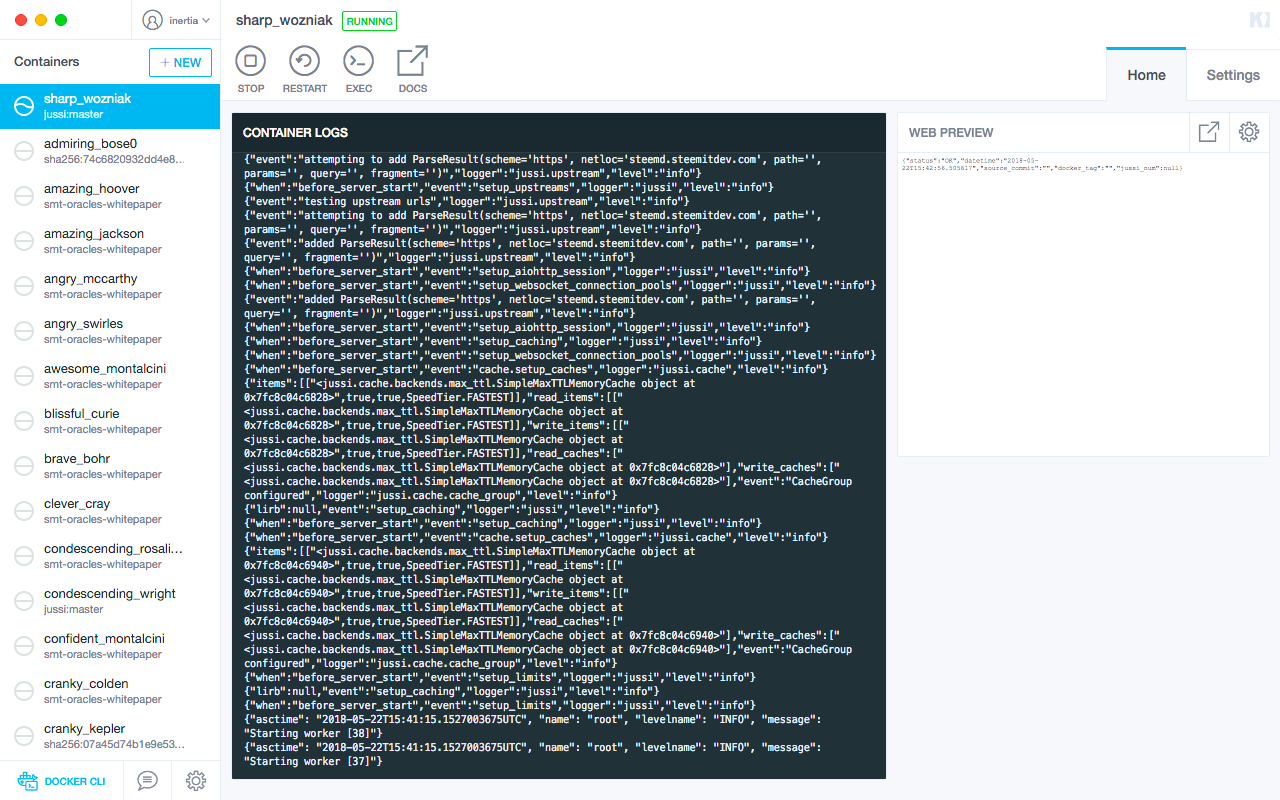 jussi in a docker container as seen from Kitematic for macOS.
Try out your local configuration:
curl -s --data '{"jsonrpc":"2.0", "method":"condenser_api.get_block", "params":[8675309], "id":1}' http://localhost:9000
See: Running Condenser, Jussi and a new service locally + adding feature flags to Condenser
Adding Upstreams
The default DEV_config.json is:
{
   "limits":{"blacklist_accounts":["badguy"]},
   "upstreams":[
      {
         "name":"hived",
         "translate_to_appbase":false,
         "urls":[["hived", "http://api.hive.blog"]],
         "ttls":[
            ["hived", 3],
            ["hived.login_api", -1],
            ["hived.network_broadcast_api", -1],
            ["hived.follow_api", 10],
            ["hived.market_history_api", 1],
            ["hived.database_api", 3],
            ["hived.database_api.get_block", -2],
            ["hived.database_api.get_block_header", -2],
            ["hived.database_api.get_content", 1],
            ["hived.database_api.get_state", 1],
            ["hived.database_api.get_state.params=['/trending']", 30],
            ["hived.database_api.get_state.params=['trending']", 30],
            ["hived.database_api.get_state.params=['/hot']", 30],
            ["hived.database_api.get_state.params=['/welcome']", 30],
            ["hived.database_api.get_state.params=['/promoted']", 30],
            ["hived.database_api.get_state.params=['/created']", 10],
            ["hived.database_api.get_dynamic_global_properties", 1]
         ],
         "timeouts":[
            ["hived", 5],
            ["hived.network_broadcast_api", 0]
         ],
         "retries": [
            ["hived", 3],
            ["hived.network_broadcast_api", 0]
         ]
      },
      {
         "name":"appbase",
         "urls":[["appbase", "https://api.hive.blog"]],
         "ttls":[
            ["appbase", -2],
            ["appbase.block_api", -2],
            ["appbase.database_api", 1]
         ],
         "timeouts":[
            ["appbase", 3],
            ["appbase.chain_api.push_block", 0],
            ["appbase.chain_api.push_transaction", 0],
            ["appbase.network_broadcast_api", 0],
            ["appbase.condenser_api.broadcast_block", 0],
            ["appbase.condenser_api.broadcast_transaction", 0],
            ["appbase.condenser_api.broadcast_transaction_synchronous", 0]
         ]
      }
   ]
}
Upstreams can be added to the upstreams array:
{
  "name": "foo",
  "urls": [["foo", "https://foo.host.name"]],
  "ttls": [["foo", 3]],
  "timeouts": [["foo", 5]]
}
Once the above upstream is added to the local config and docker has been built, the following curl will work:
curl -s --data '{"jsonrpc":"2.0", "method":"foo.bar", "params":["baz"], "id":1}' http://localhost:9000
Note: if you set translate_to_appbase as true, jussi will do the translation for you and that specific endpoint will work with libraries that don’t yet support appbase.
Benefits of jussi
Time To Live
Jussi can be configured with various TTL (Time To Live) schemes. A TTL is an integer value in seconds. Integers equal to or less than 0 have special meaning. A reasonable set of defaults would be:
| Upstream | API | Method | Parameters | TTL (seconds) |
|---|---|---|---|---|
hived |
login_api |
all | all | -1 |
hived |
network_broadcast_api |
all | all | -1 |
hived |
follow_api |
all | all | 10 |
hived |
market_history_api |
all | all | 1 |
hived |
database_api |
all | all | 3 |
hived |
database_api |
get_block |
all | -2 |
hived |
database_api |
get_block_header |
all | -2 |
hived |
database_api |
get_content |
all | 1 |
hived |
database_api |
get_state |
all | 1 |
hived |
database_api |
get_state |
'/trending' |
30 |
hived |
database_api |
get_state |
'trending' |
30 |
hived |
database_api |
get_state |
'/hot' |
30 |
hived |
database_api |
get_state |
'/welcome' |
30 |
hived |
database_api |
get_state |
'/promoted' |
30 |
hived |
database_api |
get_state |
'/created' |
10 |
hived |
database_api |
get_dynamic_global_properties |
all | 1 |
hivemind |
all | all | all | 3 |
In this case, requests for login_api and network_broadcast_api have a TTL of -1, which means requests with those namespaces are not cached, whereas follow_api request have a TTL of 10 seconds.
Some methods and parameters have their own TTL that overrides the general default, like database_api.get_block, which overrides database_api.*.
Time to Live Special Meaning
0won’t expire-1won’t be cached-2will be cached without expiration only if it isirreversiblein terms of blockchain consensus
If you have a local copy of jussi (see: Installation), you can change these defaults by modifying DEV_config.json.
Multiple Routes
Each urls key can have multiple endpoints for each namespace. For example:
{
  "urls":[
    ["appbase", "http://anyx.io"]
  ]
}
… can also be expressed as:
{
  "urls":[
    ["appbase","http://anyx.io"],
    ["appbase.condenser_api.get_account_history","http://anyx.io"],
    ["appbase.condenser_api.get_ops_in_block","http://anyx.io"]
  ]
}
In these examples, the methods get_account_history and get_ops_in_block route to a dedicated API endpoint, while the rest of the appbase namespace routes to a common endpoint.
Retry
Adding a retries element defines the number of retry attempts, where 0 (or absent) means no retry. The maximum number of retries is 3.
Note that retrying broadcast methods is not recommended, which is why the example explicitly sets hived.network_broadcast_api to 0.
json-rpc batch
Normally, a request is made with a JSON Object ({}). But jussi also supports batch requests, which is constructed with a JSON Array of Objects ([{}]).
For example, this would be a typical, non-batched JSON Object request that asks for a single block:
curl -s --data '{"jsonrpc":"2.0", "method":"condenser_api.get_block", "params":[1], "id":1}' https://api.hive.blog
{
   "id":1,
   "jsonrpc":"2.0",
   "result":{
      "previous":"0000000000000000000000000000000000000000",
      "timestamp":"2016-03-24T16:05:00",
      "witness":"initminer",
      "transaction_merkle_root":"0000000000000000000000000000000000000000",
      "extensions":[

      ],
      "witness_signature":"204f8ad56a8f5cf722a02b035a61b500aa59b9519b2c33c77a80c0a714680a5a5a7a340d909d19996613c5e4ae92146b9add8a7a663eef37d837ef881477313043",
      "transactions":[

      ],
      "block_id":"0000000109833ce528d5bbfb3f6225b39ee10086",
      "signing_key":"STM8GC13uCZbP44HzMLV6zPZGwVQ8Nt4Kji8PapsPiNq1BK153XTX",
      "transaction_ids":[

      ]
   }
}
To request more than one block using the batch construct, wrap each call in a JSON Array, that asks for two blocks in one request:
curl -s --data '[{"jsonrpc":"2.0", "method":"condenser_api.get_block", "params":[1], "id":1},{"jsonrpc":"2.0", "method":"condenser_api.get_block", "params":[2], "id":2}]' https://api.hive.blog
[
   {
      "id":1,
      "jsonrpc":"2.0",
      "result":{
         "previous":"0000000000000000000000000000000000000000",
         "timestamp":"2016-03-24T16:05:00",
         "witness":"initminer",
         "transaction_merkle_root":"0000000000000000000000000000000000000000",
         "extensions":[

         ],
         "witness_signature":"204f8ad56a8f5cf722a02b035a61b500aa59b9519b2c33c77a80c0a714680a5a5a7a340d909d19996613c5e4ae92146b9add8a7a663eef37d837ef881477313043",
         "transactions":[

         ],
         "block_id":"0000000109833ce528d5bbfb3f6225b39ee10086",
         "signing_key":"STM8GC13uCZbP44HzMLV6zPZGwVQ8Nt4Kji8PapsPiNq1BK153XTX",
         "transaction_ids":[

         ]
      }
   },
   {
      "id":2,
      "jsonrpc":"2.0",
      "result":{
         "previous":"0000000109833ce528d5bbfb3f6225b39ee10086",
         "timestamp":"2016-03-24T16:05:36",
         "witness":"initminer",
         "transaction_merkle_root":"0000000000000000000000000000000000000000",
         "extensions":[

         ],
         "witness_signature":"1f3e85ab301a600f391f11e859240f090a9404f8ebf0bf98df58eb17f455156e2d16e1dcfc621acb3a7acbedc86b6d2560fdd87ce5709e80fa333a2bbb92966df3",
         "transactions":[

         ],
         "block_id":"00000002ed04e3c3def0238f693931ee7eebbdf1",
         "signing_key":"STM8GC13uCZbP44HzMLV6zPZGwVQ8Nt4Kji8PapsPiNq1BK153XTX",
         "transaction_ids":[

         ]
      }
   }
]
Error responses are returned in the JSON Array response as well. Notice the "WRONG" parameter in the second element. The first block is returned as expected, the second one generates an error.
curl -s --data '[{"jsonrpc":"2.0", "method":"condenser_api.get_block", "params":[1], "id":1},{"jsonrpc":"2.0", "method":"condenser_api.get_block", "params":["WRONG"], "id":2}]' https://api.hive.blog
[
   {
      "jsonrpc":"2.0",
      "result":{
         "previous":"0000000000000000000000000000000000000000",
         "timestamp":"2016-03-24T16:05:00",
         "witness":"initminer",
         "transaction_merkle_root":"0000000000000000000000000000000000000000",
         "extensions":[

         ],
         "witness_signature":"204f8ad56a8f5cf722a02b035a61b500aa59b9519b2c33c77a80c0a714680a5a5a7a340d909d19996613c5e4ae92146b9add8a7a663eef37d837ef881477313043",
         "transactions":[

         ],
         "block_id":"0000000109833ce528d5bbfb3f6225b39ee10086",
         "signing_key":"STM8GC13uCZbP44HzMLV6zPZGwVQ8Nt4Kji8PapsPiNq1BK153XTX",
         "transaction_ids":[

         ]
      },
      "id":1
   },
   {
      "jsonrpc":"2.0",
      "error":{
         "code":-32000,
         "message":"Parse Error:Couldn't parse uint64_t",
         "data":{
            "code":4,
            "name":"parse_error_exception",
            "message":"Parse Error",
            "stack":[
               {
                  "context":{
                     "level":"error",
                     "file":"string.cpp",
                     "line":113,
                     "method":"to_uint64",
                     "hostname":"",
                     "timestamp":"2018-05-21T18:02:41"
                  },
                  "format":"Couldn't parse uint64_t",
                  "data":{

                  }
               },
               {
                  "context":{
                     "level":"warn",
                     "file":"string.cpp",
                     "line":116,
                     "method":"to_uint64",
                     "hostname":"",
                     "timestamp":"2018-05-21T18:02:41"
                  },
                  "format":"",
                  "data":{
                     "i":"WRONG"
                  }
               },
               {
                  "context":{
                     "level":"warn",
                     "file":"variant.cpp",
                     "line":405,
                     "method":"as_uint64",
                     "hostname":"",
                     "timestamp":"2018-05-21T18:02:41"
                  },
                  "format":"",
                  "data":{
                     "*this":"WRONG"
                  }
               }
            ]
         }
      },
      "id":2
   }
]
Also see: block_api.get_block_range
Footnotes
- Batch requests are limited to a maximum of 50 request elements.
- Also see: json-rpc batch specification
- Repository: gitlab.syncad.com/hive/jussi
Latin
jussi

noun

declension: 2nd declension
gender: neuter

Definitions:
  1. order, command, decree, ordinance, law